Visualizing the Provenance Graph
Note
If you are using a Python version older than 2.7.3, this feature will not be available due to Python bug 57885 related to sqlite3.
To generate a provenance graph related to the experiment execution, the reprounzip graph command should be used:
$ reprounzip graph graphfile.dot mypackfile.rpz
where graphfile.dot corresponds to the graph, and mypackfile.rpz corresponds to the experiment bundle.
Alternatively, you can generate the graph after running reprozip trace without creating a .rpz bundle:
$ reprounzip graph [-d tracedirectory] graphfile.dot
The graph is outputted in the DOT language. You can use Graphviz to load and visualize the graph:
$ dot -Tpng graphfile.dot -o graph.png
It is also possible to output a JSON file with the flag --json.
Command-Line Options
Since an experiment may involve a significantly large number of file dependencies, reprounzip graph offers several command-line options to control what will be shown in the provenance graph, as described below. By default it includes all information available, which is often unreadable (see fig-toobig).
Filtering Out Files
Files can be filtered out using a regular expression [1] with the flag --regex-filter. For example:
--regex-filter /~[^/]*$`will filter out files whose name begins with a tilde--regex-filter ^/usr/sharewill filter out/usr/sharerecursively--regex-filter \.bin$will filter out files with a.binextension
These flags can be passed multiple times.
Replacing Filenames
Users can remap filenames using regular expressions [1] with the flag --regex-replace. This can be used to:
simplify the graph by making filenames shorter,
aggregate multiple files to a single node by mapping them to the same name, or
fix programs that are using some type of cache or for which the wrong access was logged, such as Python’s
.pycfiles.
Example:
--regex-replace .pyc$ \.pywill replace accesses to bytecode cache files (.pyc) to the original source (.py)--regex-replace ^/dev(/.*)?$ /devwill aggregate all device files as a single path /dev--regex-replace ^/home/vagrant/experiment/data/(.*)\.bin data:\1will simplify the paths to some data files
The flag --aggregate is a shortcut allowing users to aggregate all files beginning with a given prefix. For instance, --aggregate /usr/somepath will collapse all files under /usr/somepath (this is equivalent to --regex-replace '^/usr/somepath' '/usr/somepath').
Both flags can be passed multiple times.
Controlling Levels of Detail
Users can control the levels of detail for each category of items in the provenance graph.
Software Packages
--packages filewill show all the files belonging to a package grouped under that package’s name--packages packagewill show the package as a single item, not detailing the individual files that it contains--packages dropwill entirely hide the packages, removing all their files from the graph--packages ignorewill ignore the package identification, handling their files as if they had not been detected as being part of a package
Note that regex filters and replacements are applied beforehand, so files that are remapped to a package will be shown under that package name.
Processes
--processes threadwill show every process and thread--processes processwill show every process and hide threads--processes runwill show only one node for an experiment run, even if the run is composed by multiple processes and threads
Other Files
For files that are not part of a software package, or if --packages ignore is being used:
--otherfiles allwill show every file (unless filtered by--regex-filter)--otherfiles iowill show only the input and output files, as identified in the configuration file--otherfiles nowill ignore all the files
Common Recipes
Full provenance graph (likely to be unreadable for most experiments, due to the large amount of information to be presented):
$ reprounzip graph graph.dot myexperiment.rpz

Provenance graph showing all the information available (full graph). This represents the default configuration.
Mapping Python bytecode cache files to their corresponding source file (this may help attribute file accesses to software packages):
$ reprounzip graph --regex-replace '\.pyc$' '\.py' graph.dot myexperiment.rpz
Dataflow of the experiment, showing the runs and their corresponding input and output files:
$ reprounzip graph --packages drop --otherfiles io --processes run graph.dot myexperiment.rpz
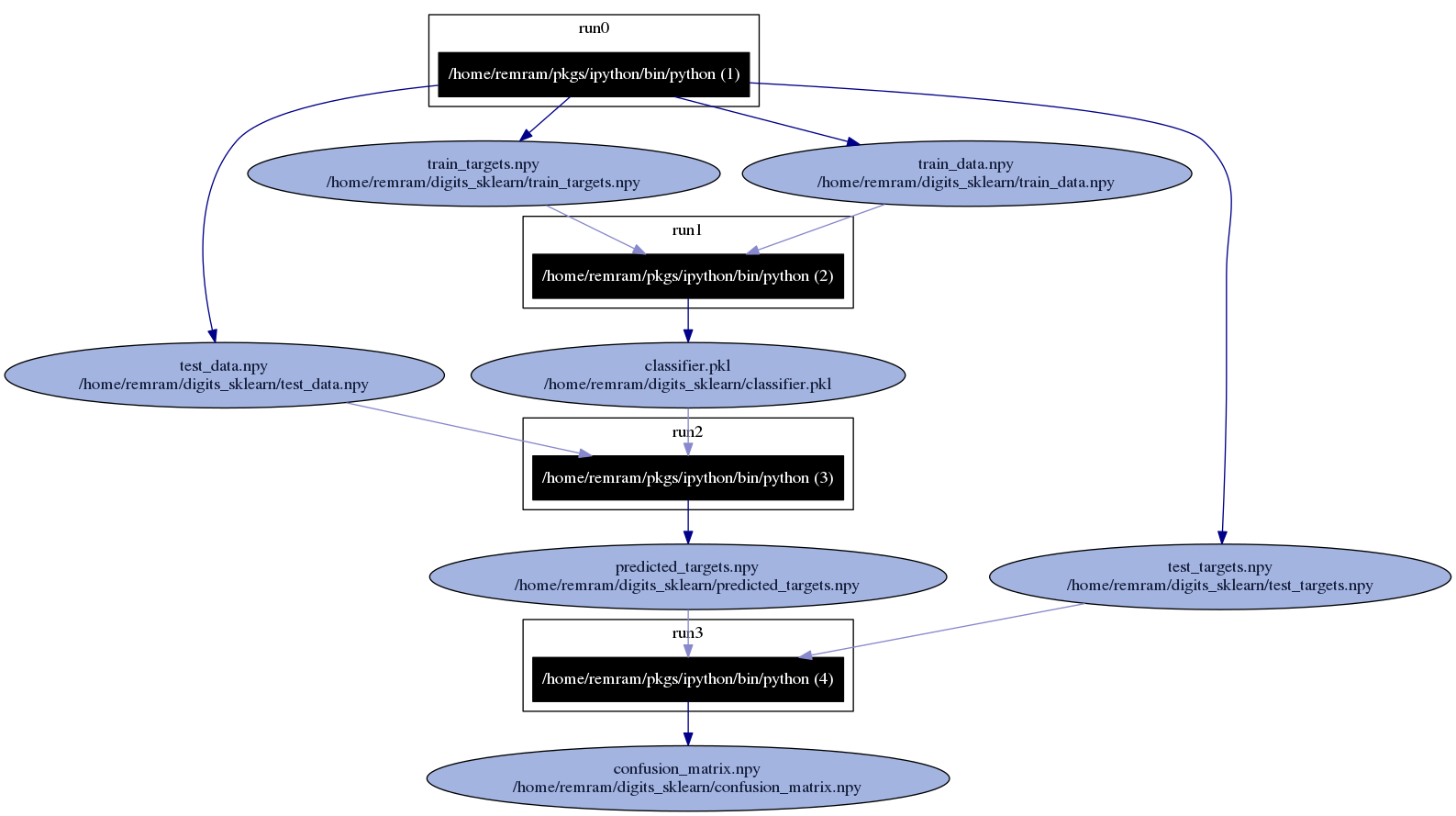
Provenance graph showing input and output files for an experiment with 4 runs.
Provenance graph showing only processes and threads (no file accesses):
$ reprounzip graph --packages drop --otherfiles drop --processes thread graph.dot myexperiment.rpz
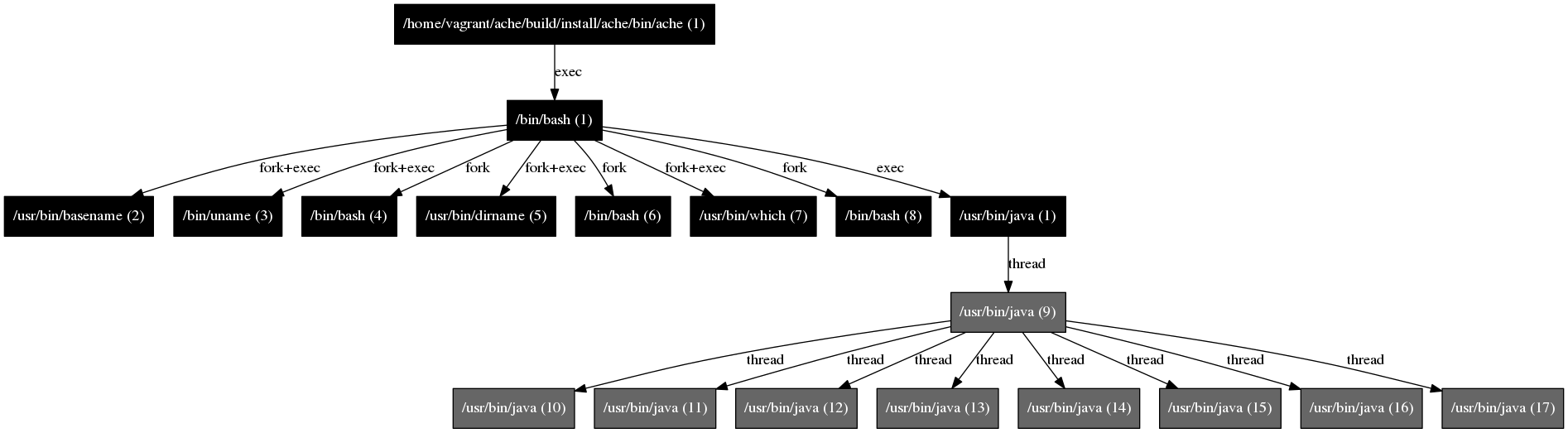
Provenance graph showing only processes and threads.